Gamescom is usually full of products fighting for attention with bigger screens, stronger motors and increasingly complicated specifications, but one of the sim racing ideas that stayed with me after Gamescom 2026 was surprisingly simple. During my time with Asetek Racing, I had the opportunity to experience its Virtual Button Box as part of a complete racing setup, and what impressed me was not a single headline specification. It was how naturally everything worked together once I was actually racing. The steering wheel felt comfortable in my hands, the feedback from the simulator made the car feel far more physical than I expected, and having interactive controls directly in the center of the wheel meant I could manage different functions without feeling like I was operating a collection of separate peripherals. For me, that combination made the experience feel much closer to sitting inside a purpose-built racing cockpit than simply playing a racing game with expensive hardware.

A Virtual Button Box Built Into the Wheel
The Virtual Button Box is part of Asetek’s RaceHub 4.5 software ecosystem and uses the existing RaceView touchscreen found on compatible Formula Pro steering wheels instead of requiring another physical control panel somewhere on the simulator rig. A swipe on the 4.3-inch RaceView display brings up as many as six customizable virtual buttons, which can be assigned to functions such as pit commands, voice communication, streaming controls or other inputs the driver wants immediately accessible. When the controls are no longer being used, the interface automatically disappears so the screen can return to displaying telemetry. That sounds like a small software feature on paper, but after using it I think the important part is the location. The controls are directly in front of the driver and attached to the object your hands are already using throughout the race.
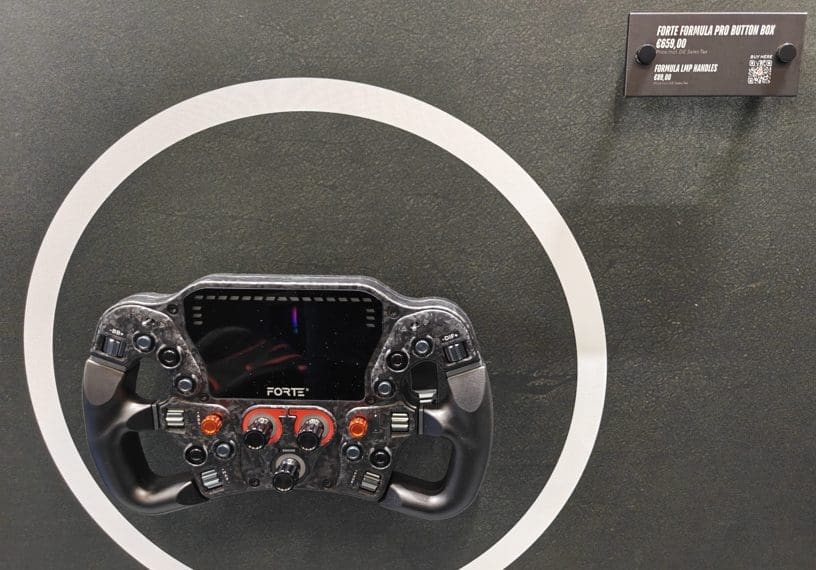
The hardware supporting the system is also much more capable than the phrase Virtual Button Box might suggest. On the Forte Formula Pro, for example, RaceView uses a 4.3-inch LCD touchscreen with an 800 x 480 resolution and a 60 Hz refresh rate. The wheel itself offers 78 inputs and 47 customizable aRGB LEDs, with three 12-position absolute rotary encoders, six thumb wheels, two seven-way switches, ten push buttons, two rocker switches and two paddles. There are also 15 RevLEDs and six FlagLEDs, while RaceHub handles customization and SimHub support allows users to combine their preferred telemetry dashboards with Asetek’s own display functions. The wheel measures around 300 to 304 mm depending on the chosen handles, uses aluminum buttons and encoders, and includes Asetek’s quick-release system while also offering USB-C connectivity for third-party quick-release solutions. What Asetek has effectively done is take a display that was already useful for RPM, gear, temperatures, fuel and other telemetry, and turn part of that same hardware into another input device through software.
My Gamescom Experience Was More Convincing Than the Specification Sheet
The strongest part of my Gamescom 2026 demonstration was simply how realistic the entire experience felt once the race started. The feedback coming through the setup made the movement of the car feel physical rather than cosmetic. Changes in the road surface, the car loading up through a corner and the reactions of the steering system gave me information through my hands instead of forcing me to rely entirely on what was happening on the monitor. I enjoyed every moment of the session because the hardware did a good job of disappearing behind the experience. I was not constantly thinking about the controller in my hands. I was thinking about braking points, steering inputs and what the car was doing. That is probably the best compliment I can give a sim racing setup because immersion disappears very quickly when a steering wheel feels uncomfortable, artificial or disconnected from what is happening on screen.
The touchscreen became more interesting once I started interacting with it during the race. Instead of treating the display as something I occasionally looked at for telemetry, I could actually use the center of the wheel to perform additional actions without reaching toward another piece of equipment. I found the controls comfortable to use and, more importantly, useful while driving. There is obviously a limit to how much touchscreen interaction I would personally want during a difficult corner or a close fight with another driver. Physical buttons still have an advantage because muscle memory allows you to find them without looking. But for functions you use less frequently, especially pit-related commands or secondary controls, the Virtual Button Box makes a lot of sense. The screen is already directly in front of you, so using it felt considerably more natural to me than moving one hand away from the wheel and searching for a separate panel mounted somewhere beside the cockpit.

Why the Virtual Button Box Makes Sense
What I like most about Asetek’s approach is that it improves existing hardware rather than asking users to solve every problem by purchasing another accessory. Traditional sim racing cockpits can become crowded very quickly. You start with the wheelbase, pedals and steering wheel, then add shifters, handbrakes, button boxes, displays and mounting hardware until the setup begins to resemble a wiring project. RaceHub 4.5 gives compatible RaceView owners up to six extra customizable controls without another device, cable or mounting position. The same software update also expanded RaceHub’s wider functionality, including support for additional hardware and a larger number of wheelbase presets. I do not think the Virtual Button Box completely replaces a dedicated physical button box for every serious sim racer, particularly drivers who depend heavily on tactile controls, but I do think it can make one unnecessary for many users. That is an important distinction because the feature is most impressive when viewed as added functionality rather than a marketing claim that physical controls are suddenly obsolete.
Summary
After trying Asetek’s setup at Gamescom 2026, the Virtual Button Box ended up being one of those features that made considerably more sense in my hands than it did when I first read about it. Six customizable touchscreen controls may not sound revolutionary, but combining them with a responsive 4.3-inch 60 Hz RaceView display, extensive physical inputs and the broader RaceHub ecosystem creates a steering wheel that feels flexible without becoming unnecessarily complicated. My experience was extremely positive: the steering felt comfortable, the feedback made the racing surprisingly convincing, and I genuinely enjoyed being able to perform different actions from the touchscreen while staying focused on the race. I still prefer physical controls for functions that need to be triggered instantly without looking, so I would not call the traditional button box dead. What Asetek has created is something more practical: a smart way to give sim racers more control using hardware they already have, and after experiencing it personally at Gamescom, it is a feature I would genuinely want available on my own sim racing setup.